Compare bank statement converters
Facts read on each product's own website on November 21, 2026, with links. We say where the others are better.
| SheetProof Convert | DocuClipper | Bank Statement Converter | PDFBankToExcel | |
|---|---|---|---|---|
| Where your statement is read | In your browser, on your device. Nothing is uploaded: the converter shows the number of network requests made while your file is read (0), and it works with Wi-Fi off. | Uploaded to DocuClipper. Their pricing page says files are "encrypted in transit and in storage" and can be deleted at any time; their site says it is SOC 2 Type II audited source | Uploaded. Their privacy policy: uploaded documents "persist on our servers for 24 hours. After 24 hours they are deleted." source | In your browser, locally. Their page: "Your PDF stays on your device"; digital PDFs convert with Wi-Fi off. Scanned PDFs load a local OCR worker on first use source |
| Free | 10 pages a day, no account, no card. The whole file is exported: no row limit | 14-day trial, up to 120 pages, no card source | 1 page every 24 hours without an account; 5 pages every 24 hours with a free account source | One statement preview every 24 hours; the free export is limited to the first 8 transactions source |
| Paid | Pro: $9 a month, unlimited pages, cancel from your Gumroad library | From $29 a month for 60 pages billed monthly, or $20.30 a month billed annually ($243.60 a year); $39 for 120 pages; $79 for 300; Business from $159 source | Starter $30 a month for 400 pages; Professional $60 for 1,000; Business $99 for 4,000. Annual plans available source | Starter $19 a month for 600 pages; Professional $39 for 1,500; Business $69 for 5,000 (up to 5 computers). Billed through Gumroad source |
| Balance check | Yes: opening balance + every transaction = closing balance, plus every balance the bank prints on the rows. The first row that breaks is named | Yes: "every statement checked against its printed balances" source | Not mentioned. Their page says: if a file does not convert correctly, write to them and they will fix it source | Yes, per row: each transaction is checked against the statement’s running balance. The page does not describe an opening + transactions = closing check source |
| Proof inside the exported file | Yes: a Proof tab built from live Excel formulas. Your accountant can re-check it without trusting us | Not described on the pages we read | Not described on the pages we read | Three sheets (transactions, categories, monthly summary). The page does not say whether the workbook has live formulas or a proof sheet source |
| Scanned PDFs | Experimental OCR on your device: it can misread digits, so every row must be checked (measured on 5 sample pages, see Tested on) | Yes: "any bank, scanned or digital" source | Not stated on the pages we read | Yes, with a local OCR worker source |
| Credit card statements | No: checking and savings only, for now | Yes source | Not stated on the pages we read | Not stated on the page we read |
| Export formats | Excel (.xlsx), CSV, OFX, a CSV in the QuickBooks layout and a CSV in the layout Xero describes, for statements that balance (OFX and QuickBooks CSV test-imported into GnuCash; not tried in QuickBooks or Xero) | Excel, CSV, QBO, Xero, OFX, QFX, QIF source | Excel and CSV source | Excel, CSV, QuickBooks CSV, Xero CSV, QuickBooks .QBO source |
| Volume and API | Up to 12 PDFs at once; no API | Up to 100 files at a time; Google Drive, Dropbox, email, API source | API available (API docs linked in their footer) source | Not stated; Business plan covers up to 5 computers source |
| Several months at once | Yes: select the months together and get one workbook plus a Chain proof: each month balances and each month opens where the last one closed (tested in Excel and Google Sheets) | Batch upload; their client report names missing months and totals each period against the printed opening and closing balances. A closing-to-opening check with live formulas inside the exported file is not described on the pages we read source | Not stated on the pages we read | A monthly summary sheet is described; a month-to-month continuity check is not source |
| Reviews | None yet: new in November 2026. Test results are public on the Tested on page | Trustpilot 1.4 / 5 from 39 reviews, 92% one-star, most about billing and cancelling. Their own site shows 4.7 / 5 from 124 reviews (G2 and similar) source | Trustpilot 2.6 / 5 from 4 reviews source | Launched on Product Hunt in 2026: 1 upvote, no reviews yet source |
Competitor facts read on their own websites on November 21, 2026, each with its source link. Prices and plans change: check their pages before you decide. Spotted something out of date? Write to support@getsheetproof.com and we will fix it.
The exported file, side by side
We converted the same fictional statement (30 rows) with the free, anonymous flows of three other tools on November 21, 2026 and opened every result in Microsoft Excel. All four read all 30 rows with the right amounts and signs. The difference is what the file gives you afterwards.
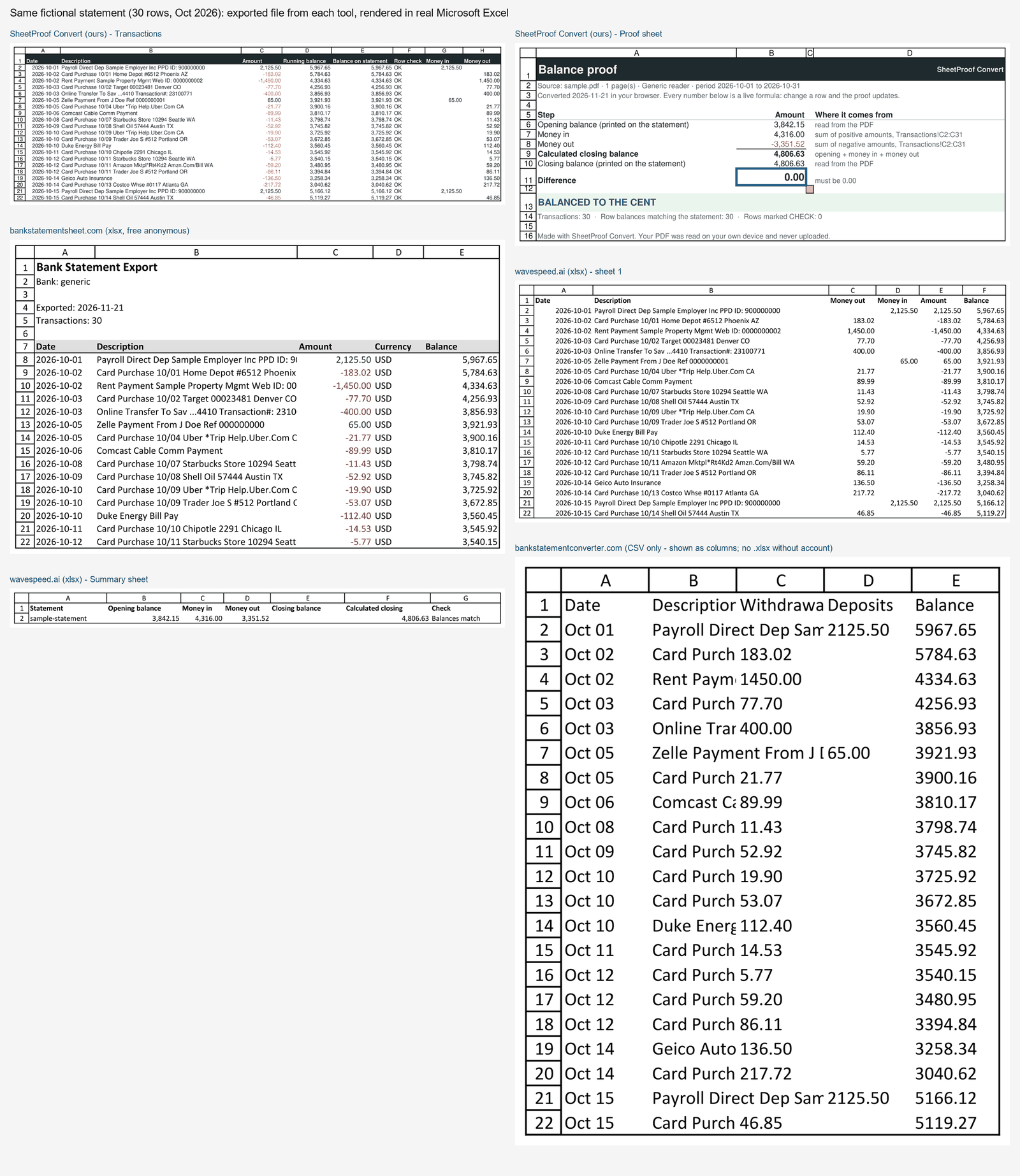
| SheetProof Convert | bankstatementsheet.com | wavespeed.ai free tool | bankstatementconverter.com | |
|---|---|---|---|---|
| Proof inside the file | Proof tab, live formulas, a verdict, every row marked OK or CHECK | No. The "reconciled" message stays on their web page | A Summary sheet; "Balances match" is typed text, not a formula, and the closing balance cell was empty | No |
| Formulas in the file | Yes | None | None | None (CSV) |
| Dates | Real dates, yyyy-mm-dd | Text, yyyy-mm-dd | Real dates, yyyy-mm-dd | Text, "Oct 01" (no year) |
| Money in / Money out columns | Yes, plus the signed Amount | No, signed Amount only | Yes, plus the signed Amount | Yes (Withdrawals, Deposits) |
| Totals | In the Proof tab. The data sheet stays a clean table for imports | Under the data (Total Income, Total Expenses, Net) | In the Summary sheet | None |
| Limit we saw without an account | 10 pages a day, whole file exported | 5 conversions a month | No page limit stated | 1 page every 24 hours |
| Files we got without an account | .xlsx, .csv, and .ofx when the statement balances | .xlsx and .csv (OFX is paid) | .xlsx | .csv only, 1 page every 24 hours |
What we saw in each tool on that day; their products may have changed since. Where they are ahead: bankstatementsheet shows totals right under the transactions, which some people prefer to a separate tab, and the wavespeed tool states no page limit while ours is 10 pages a day.
vs DocuClipper vs Bank Statement Converter vs PDFBankToExcel