Bank statement PDF to Google Sheets.
Convert the PDF in your browser, then open the file in Google Sheets. The conversion never leaves your device; Sheets only sees the spreadsheet you choose to upload.
Drop your statement PDF
Chase, Bank of America, Wells Fargo, TD Bank and other banks (generic reader)
Several months? Select them together: you also get a month-to-month check.
OFX, the QuickBooks CSV and the Xero CSV are for accounting software that imports bank files, and are offered only when the statement balances to the cent. We test-imported the OFX and the QuickBooks CSV into GnuCash (free accounting software): every row, date, sign and the closing balance came out as on the statement. The QuickBooks CSV follows Intuit's published three-column layout (Date, Description, Amount); the Xero CSV has the columns Xero's help page describes (Date, Amount, Description, Cheque number; money out negative; no balances). GnuCash is not QuickBooks or Xero, we have not tried those two, and the Xero CSV has not been imported into Xero by us.
Tested in Microsoft Excel for Windows and Google Sheets (Excel for the web: not tested yet).
One workbook: a Chain proof sheet (live formulas: each month balances, and closing = next opening) and every transaction in one table.
Chase, Bank of America, Wells Fargo and TD Bank: tested on synthetic statements in their layouts and on the sample statements Wells Fargo and TD Bank publish, not yet on customer statements. U.S. Bank and Citi: no official sample exists that we could find, so they use the generic reader. Every file shows whether it balanced. How we test
The steps
Convert the statement here and download the Excel (.xlsx) file.
In Google Drive choose New, then File upload, and pick the .xlsx. Open it with Google Sheets.
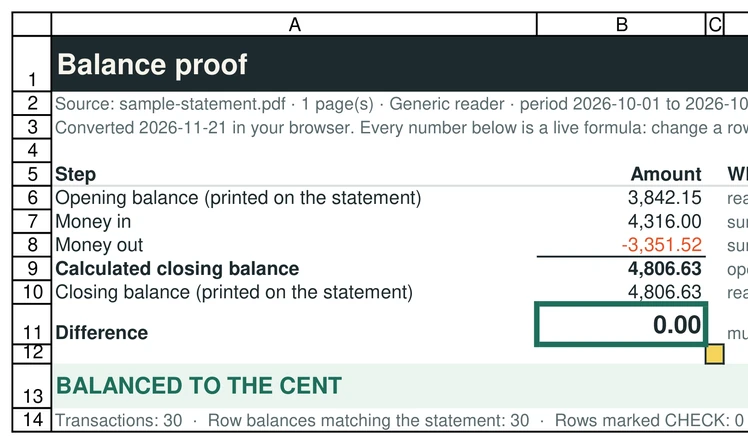
Look at the Proof tab: the Difference cell should read 0.00. The formulas recalculate in Sheets.
Prefer a single tab? Download the CSV and use File, Import in Sheets.
What was tested
The Excel file from the sample statement was uploaded to Google Drive and opened in Google Sheets on 2026-11-21: the Transactions and Proof tabs came across, the Proof formulas recalculated (Difference 0.00 for the sample, 53.07 for the sample with a row deleted) and the red CHECK highlighting was kept. That test found a cosmetic bug (a Difference shown as -0.00), which is fixed. Excel for the web has not been tested yet.
Privacy, honestly
The PDF is read on your device. When you upload the spreadsheet to Google Drive you are choosing to put its contents on Google's servers, as with any file you upload there. If that is not acceptable for a statement, open the .xlsx in Excel instead.
Questions
Does the Proof tab work in Google Sheets?
Yes. We opened the sample in Google Sheets on 2026-11-21 and the Proof formulas recalculated. Open yours and check the Difference cell reads 0.00. Excel for the web is not tested yet.
Can I import the PDF directly into Sheets?
Google Sheets cannot read a PDF table by itself. Convert it first, then open the spreadsheet.
Is the conversion free?
Yes: 10 pages a day, no account.