Combine several bank statements into one Excel file and check the months line up.
Select the monthly PDFs together. You get every transaction in one table and a Chain proof sheet that shows whether the months line up.
Drop your statement PDF
Chase, Bank of America, Wells Fargo, TD Bank and other banks (generic reader)
Several months? Select them together: you also get a month-to-month check.
OFX, the QuickBooks CSV and the Xero CSV are for accounting software that imports bank files, and are offered only when the statement balances to the cent. We test-imported the OFX and the QuickBooks CSV into GnuCash (free accounting software): every row, date, sign and the closing balance came out as on the statement. The QuickBooks CSV follows Intuit's published three-column layout (Date, Description, Amount); the Xero CSV has the columns Xero's help page describes (Date, Amount, Description, Cheque number; money out negative; no balances). GnuCash is not QuickBooks or Xero, we have not tried those two, and the Xero CSV has not been imported into Xero by us.
Tested in Microsoft Excel for Windows and Google Sheets (Excel for the web: not tested yet).
One workbook: a Chain proof sheet (live formulas: each month balances, and closing = next opening) and every transaction in one table.
Chase, Bank of America, Wells Fargo and TD Bank: tested on synthetic statements in their layouts and on the sample statements Wells Fargo and TD Bank publish, not yet on customer statements. U.S. Bank and Citi: no official sample exists that we could find, so they use the generic reader. Every file shows whether it balanced. How we test
How it works
Choose the PDFs together (hold Ctrl or Shift, or Cmd on a Mac) or drop them on the box above. Up to 12 files, in any order.
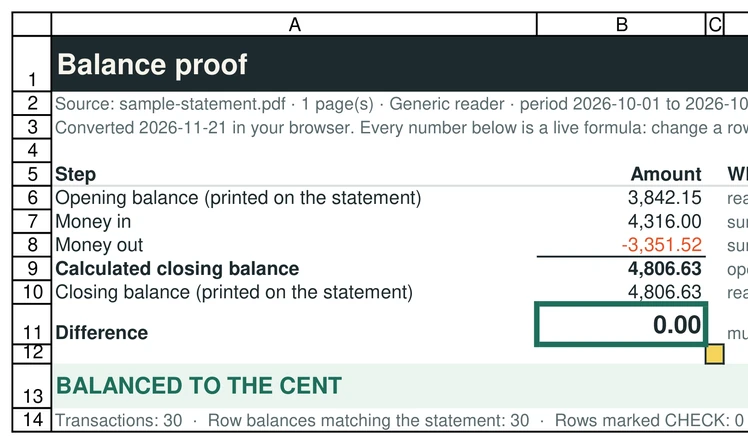
Each statement is read on your device and checked on its own: opening balance + money in + money out = closing balance.
The months are put in date order and every link is checked: the closing balance of one month must equal the opening balance of the next, and the dates must follow each other.
Download one workbook: a Chain proof sheet and an All transactions sheet.
What the Chain proof catches
A converter can handle every file correctly and still hand you a year with a month missing. When the closing balance of March is not the opening balance of May, the tool shows both numbers, the difference and how many days apart the two statements are, and the Chain proof marks the row CHECK. It also flags a statement that overlaps the next one, the same statement added twice, and a month that does not balance on its own.
The check is made of live Excel formulas over the combined table, so an accountant can re-check it without trusting us. Tested in Microsoft Excel for Windows with a complete chain and with a missing month.
What it does not do
It cannot know about a month you did not give it: if you drop January and March only, it tells you the two balances do not meet, not that February exists, and a month missing before the first or after the last statement cannot show at all. Only statements of the same account chain: the tool compares the bank and, when the statements print them, the last four digits of the account, but two accounts with the same balance would still look alike, so check the account yourself. Statements more than 7 days apart, or overlapping, are flagged. Scanned statements and credit card statements are not read.
Questions
How many statements can I combine?
Up to 12 PDFs per batch. Free pages are counted per day (10 a day), so ten one-page statements fit in a day; for more, convert in two days or use Pro when it opens.
Do I have to put the PDFs in order?
No. They are sorted by the statement period printed on each one.
Are the files uploaded to combine them?
No. Every PDF is read in your browser. The result shows the number of network requests made while your files were read (0).
What if one month does not balance?
That month is marked CHECK on the Chain proof and the verdict says so; the chain is never called complete while a month fails.