Bank statement PDF to a CSV in the QuickBooks layout.
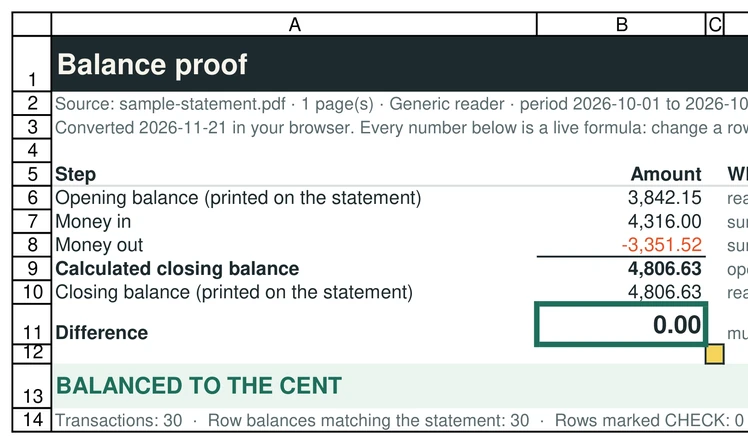
When your bank only gives you a PDF, convert it here and import the CSV. The balance check tells you whether every transaction made it across.
Drop your statement PDF
Chase, Bank of America, Wells Fargo, TD Bank and other banks (generic reader)
Several months? Select them together: you also get a month-to-month check.
OFX, the QuickBooks CSV and the Xero CSV are for accounting software that imports bank files, and are offered only when the statement balances to the cent. We test-imported the OFX and the QuickBooks CSV into GnuCash (free accounting software): every row, date, sign and the closing balance came out as on the statement. The QuickBooks CSV follows Intuit's published three-column layout (Date, Description, Amount); the Xero CSV has the columns Xero's help page describes (Date, Amount, Description, Cheque number; money out negative; no balances). GnuCash is not QuickBooks or Xero, we have not tried those two, and the Xero CSV has not been imported into Xero by us.
Tested in Microsoft Excel for Windows and Google Sheets (Excel for the web: not tested yet).
One workbook: a Chain proof sheet (live formulas: each month balances, and closing = next opening) and every transaction in one table.
Chase, Bank of America, Wells Fargo and TD Bank: tested on synthetic statements in their layouts and on the sample statements Wells Fargo and TD Bank publish, not yet on customer statements. U.S. Bank and Citi: no official sample exists that we could find, so they use the generic reader. Every file shows whether it balanced. How we test
The steps
Drop the statement PDF on this page and wait for the verdict.
If it says "Balanced to the cent", click CSV for QuickBooks (Date as MM/DD/YYYY, Description without @ # $ %, Amount with money out negative).
In QuickBooks Online, open the banking page and choose to upload transactions from a file. Pick the CSV and map Date, Description and Amount (a single Amount column with negatives for money out). Menu names change, so look for the upload-from-file option.
Tested: import into GnuCash (free)
We test-imported the downloads into GnuCash 5.17 for Windows with three public sample statements that balance and one synthetic statement full of awkward descriptions (ampersands, commas, quotes, accents, two identical rows on the same day). The OFX files matched in all four cases and the QuickBooks-layout CSV in two (Wells Fargo and the synthetic statement): the number of rows, every date, every amount with its sign and the final account balance came out as on the statement, to the cent. Importing the same file a second time added no duplicates (checked on the Wells Fargo sample, OFX and CSV). This tests our files, not QuickBooks or Xero.
OFX: File, Import, Import OFX/QFX, then pick the account when GnuCash asks. CSV: File, Import, Import Transactions from CSV; set the date format to month-day-year and the currency format to a decimal point (the default follows your computer language and can misread 1,234.56), skip 1 header row, and map the columns to Date, Description and Amount. GnuCash then asks for the other side of each transaction (a category), as any double-entry program does.
What this does not do
SheetProof Convert does not create .QBO files and does not connect to QuickBooks. QBO files need bank identifiers that a PDF does not contain. It does offer an OFX download when the statement balances, with a placeholder bank identifier (000000000) and the last four digits of the account when the PDF prints them; we checked it with two open-source OFX readers and test-imported it into GnuCash (not into QuickBooks), so use the CSV if the OFX import complains. If your bank offers a direct QBO or bank feed, use it: it is more reliable than any PDF. This tool is for the statements you only have as PDFs, for example older months or a statement a client sent you.
Why check the total first
Importing a CSV with one missing transaction puts your books out of balance in a way that is hard to trace weeks later. The check on this page compares the opening balance plus every row with the closing balance printed on the statement, and names the first row that breaks.
Questions
Does QuickBooks accept this CSV?
QuickBooks Online asks for a CSV with Date, Description and Amount columns (Intuit's help page on formatting CSV files for bank transactions). The "CSV for QuickBooks" download follows that layout. We have not imported it into QuickBooks ourselves: we checked the layout and test-imported the same file into GnuCash, where all rows, dates, signs and the final balance matched. GnuCash is a different program, so map the columns in the QuickBooks import preview and check the first rows.
Is my client’s statement uploaded?
No. It is read in your browser. If you work with client statements, you can show them the Wi-Fi test on the home page.
Can I convert many statements at once?
Up to 12 PDFs together get one workbook with a month-to-month check; the QuickBooks CSV is made for one statement at a time. There is no API yet.